Open port MODEM to publish web server
1. Setup LAN host address:
When you turn VX+ auto asigned LAN IP is fixed. Example: 192.168.1.2 is IP LAN server.
* You need create fixed IP:
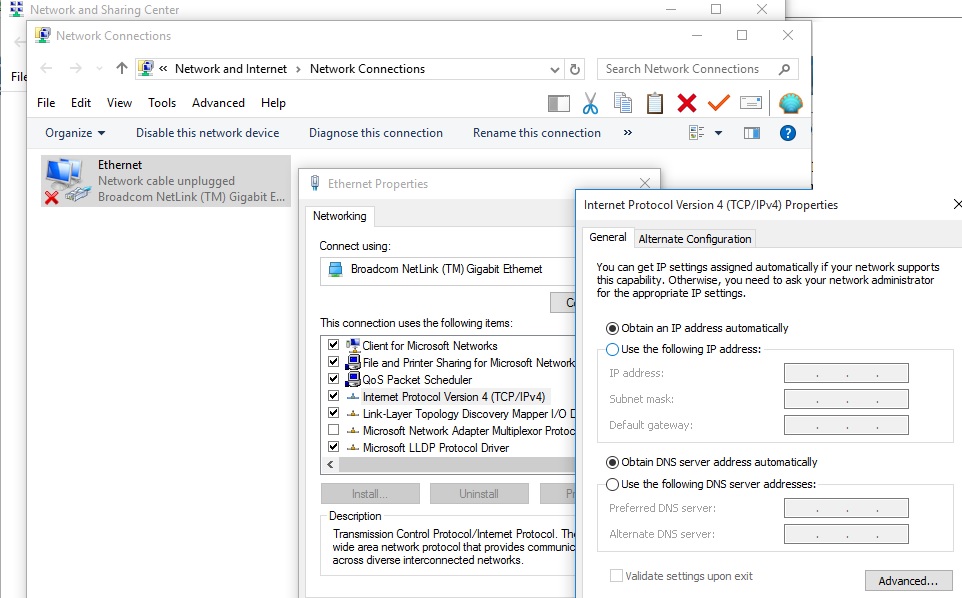
* And then choose IP like below image:
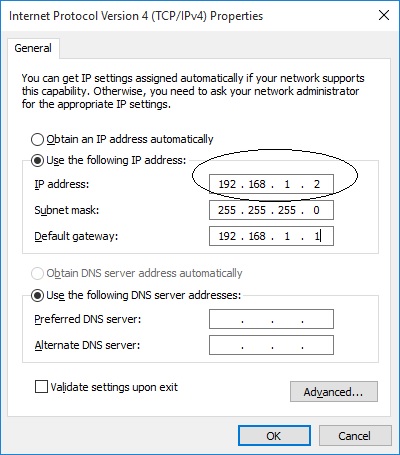
Sometime, you want demo, you used IP: localhost (or 127.0.01).
2. To publich Internet web server (open port):
You turn on VX. Next you need open port MODEM (NAT) to remote computer to connect web server.
(see help to open port modem).
* Note, port modem:
Webserver choose Virtual Server:
Server name : Webserver
External Port Start: 80
External Port End: 80
Internal Port Start: 80
Internal Port End: 80
Server IP Address: 192.168.1.2
Protocol: TCP
* Importan: You need click Enable Firewall in windows is false and call Internet Service Provider to disable firewall and open port 80 and port 443.
* If in webserver you can access this website and remote you can't access this website you need contact ISP to open port.
* You can check open port in any website.